Note: SEO Title Tag 2.1.3 adds compatibility with WordPress 2.5!
Title tags are arguably the most important of the on-page factors for search engine optimization (”SEO”). It blows my mind how post titles are also used as title tags by WordPress, considering that post titles should be catchy, pithy, and short-and-sweet; whereas title tags should incorporate synonyms and alternate phrases to capture additional search visibility.
Now, thankfully, there is a solution, allowing you to decouple post titles from title tags. Introducing… the SEO Title Tag 2.1.3 WordPress plugin.
SEO Title Tag makes is dead-easy to optimize the title tags across your WordPress-powered blog or website. Not just your posts, not just your home page, but any and every title tag on your site! If this plugin, along with a few hours of keyword research and copywriting of optimized titles, doesn’t make a significant impact on your search traffic, you’re doing something wrong!
SEO Title Tag is authored by SEO specialist web agency Netconcepts. Version 1.0 was by Netconcepts’ president Stephan Spencer. Version 2.0 was a collaborative effort — Stephan did the concept development and Netconcepts’ code jockeys Oliver Kastler, Mike Harding and Elton Fry did all the heavy lifting. It is completely free and has been released as “open source” under the GPL license. So enjoy!
Features include:
- Allows you to override a page’s or a post’s title tag with a custom one.
- New for v2.0 A Title Tag input box in the Edit Post and Write Post forms. (Previously in version 1.0 you had to use the Custom Field box.)
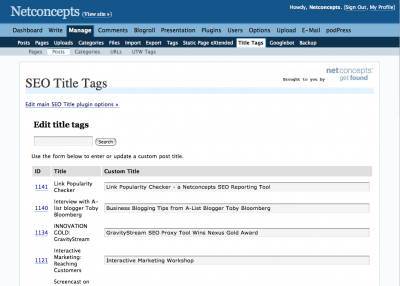
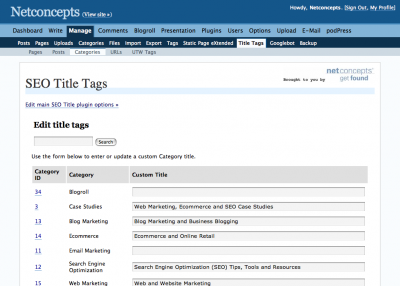
- New for v2.0 Mass editing of title tags for all posts, static pages, category pages, tag pages, tag conjunction pages, archive by month pages, — indeed, any URL — all in one go.
- Define a custom title tag for your home page (or, more accurately, your Posts page, if you have chosen a static Front Page set under Options -> Reading), through the Options -> SEO Title Tag page in the WordPress admin.
- New for v2.0 Define the title tag of 404 error pages, also through Options -> SEO Title Tag.
- New for v2.0 Handles internal search result pages too.
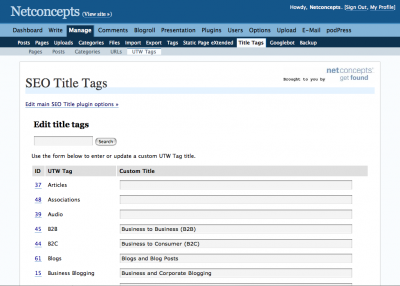
- For users of the UltimateTagWarrior plugin (which should be everybody!), incorporates the tag name into the title tag on “tag pages” (sorry for the confusing use of “tag” in two contexts here — as in tagging and HTML title tags).
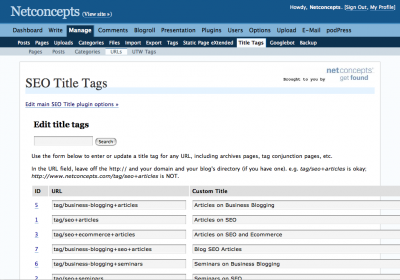
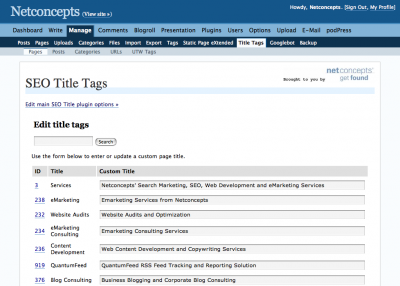
- New for v2.0 (When used with Ultimate Tag Warrior) Customize the title tags on tag pages, and on tag conjunction pages too (e.g. http://www.netconcepts.com/tag/seo+articles). The latter is done through Manage -> Title Tags -> URLs; see this screenshot for an example.
- New for v2.0 Title tags of category pages can optionally be set to the category description. If you use a Meta Tag plugin like Add Meta Tags, then you should not use this feature and instead let the Meta Tag plugin use the category description for the meta description on category pages.
- If you choose to keep the blog name in your title tags (not recommended!), the order of the blog name and the title are automatically reversed, giving more keyword prominence to the title instead of the blog name. Note there is also an option to replace your blog name with a shorter blog nickname.
And best of all, the plugin is FREE!
Suitably convinced? Then Download the plugin!
NEW: Rate this plugin at WordPress.org
Screenshots
Installation instructions
- (If upgrading from a prior version of SEO Title Tag, be sure to deactivate the old version beforehand.)
- Upload the seo-title-tag directory and the files within it to your wp-content/plugins directory.
- Activate the plugin.
- Under Presentation -> Theme Editor in the WordPress admin, select “Header” from the list and replace:
<title><?php bloginfo('name'); wp_title(); ?></title>(or whatever you have in your <title> container with:
<title><?php if (function_exists('seo_title_tag')) { seo_title_tag(); } else { bloginfo('name'); wp_title();} ?></title> - Configure the settings under Options -> SEO Title Tag. You’ll want specify a title tag for your home page which will override your blog name as the home page’s title tag, specify a title tag for 404 error pages, and enable the UltimateTagWarrior support if using that plugin. You can also configure here whether you want all the rest of your site’s title tags to have your blog name, or a shortened version of your blog name, or neither, appended to the end. IMPORTANT: You must save the settings, even if you haven’t changed them from their defaults, in order to ensure that the title tags for Posts and for Pages works properly.
- For those of you with a static Front Page chosen under Options -> Reading, the “home page” described in the point above is actually the Posts page, and as such, the SEO Title Tag options page will actually will say “Posts Page” instead of “Home Page” — because it detects that you have selected a static Front Page. In such a scenario, in order to also customize the Front Page’s title tag, specify a Title Tag on that page’s Edit Page form, or within Manage -> Title Tags -> Pages.
- Define custom title tags for your existing posts, static pages, category pages, tag pages and tag conjunction pages (if using UltimateTagWarrior) in the admin under Manage -> Title Tags.
- When writing a new post/page, define a title tag by typing something into the “Title Tag (optional)” field. If you’re happy to use the post title as the title tag, then you can leave it blank.
- Note: If upgrading to WordPress 2.3 from a prior version where you used the SEO-Title-Tag plugin with Ultimate Tag Warrior (UTW) in order to migrate your old tag page titles you need to first import your UTW tags into the new native tagging structure. You can do this in your WordPress admin by clicking on Manage > Import > Ultimate Tag Warrior. Once you have these imported just deactivate and reactivate SEO-Title-Tags and your old title tags will be able to be used.
To learn more about search engine optimizing your WordPress blog, you’ll probably want to read Stephan Spencer’s 10 tip series on Blog SEO.
To-do
- support mass editing of meta descriptions?
- import titles by uploading a file in CSV format
- possibly rename custom option fields and table name
- move the UTW tags to an extra table (like categories)
- autocheck if plugin upgrade is available (like Podpress does)
- add some more text to the titles of tag pages globally. They are using the same divider as used for posts, and really there should be an option to add something like “Tag | Posts Related to Tag | Blog Name”
- create all needed values on activation so that you no longer have to save the settings in the SEO Title Tag Options before the plugin will work properly
Feedback?
Got a bug to report? Or an enhancement to recommend? Or perhaps even some code to submit for inclusion in the next release? Great! Share your feedback with the author, Stephan Spencer, either below or on his blog at this post.
UPDATE: 2.0beta2 has some important bug fixes, including the issue where Options weren’t updating and the Manage > subtab wasn’t displaying.
UPDATE: 2.0beta3 has more important bug fixes, including the issue where MySQL tables were sometimes not being created, and PHP tags weren’t all consistently starting with <?php but instead the <? shorthand which doesn’t work on some server configurations.
UPDATE: 2.0beta5 has more fixes for MySQL issues some folks were having. Also fixed a IIS server incompatibility issue.
UPDATE: 2.0beta6 fixes a problem where some folks were seeing a “No Posts Found” message under Manage -> Title Tags -> Posts even though the blog has posts. And it fixes a problem for users of WordPress version 2.0.5 and earlier, where titles on category pages weren’t showing up due to an undefined function attribute_escape (a new function introduced in WordPress 2.0.6).
UPDATE: 2.0beta7 fixes a problem with the page number sometimes appearing on static pages and a problem with a MySQL error on the Manage > Title Tags > Posts page.
UPDATE: 2.0RC1 fixes categories showing a warning if there are no category title tags set; Manage Posts filtering out everything thats not a post (images, pages). Also added and tested fix for menu links (”edit.php”).
UPDATE: 2.0RC2 fixes a problem with backslashes appearing before apostrophes.
UPDATE: 2.1.0 adds WordPress 2.3 compatibility.
UPDATE: 2.1.1 fixes bug where old title tags for UTW tag pages weren’t being imported. Also fixes WordPress 2.3 bug of not displaying page titles for tag intersections and unions correctly.
UPDATE: 2.1.2 fixes display issues with international characters.
UPDATE: 2.1.3 fixes issue with extra slashes being added. Also adds Nonce support for extra security.
About the Author
This plugin was developed by Netconcepts, a web agency specializing in SEO, ecommerce, and blog marketing. Friends of Netconcepts include Montgomery Wards, LL Bean, Skechers, Ralph Lauren, Pottery Barn Kids & Teen,
Hello Direct, Home Visions, Bellacor, Charles Keath, Your Kids Direct, Northern Tool + Equipment, TireRack, Sur La Table, Abbey Press, Toolfetch, Cabela’s, Hancock Fabrics, Invitations by Dawn, Metro Style, Brylane Home, Woman Within Plus Size Clothing, and Expedia Australia. Netconcepts was founded in 1995 by Stephan Spencer and is based in Madison, Wisconsin with a production office in Auckland, New Zealand.


[…] Optimal Title / SEO Title : Good title tags are not just for search engines. They also appear in the users history and possibly bookmarks. Title tags should be specific -> generic. So, don’t start all your tittle tags with your blog name please. […]
by 7 Usability Wordpress Plugins » BloggerDesign.com : Design Optimization Usability — August 18, 2006 @ 2:13 am
Perhaps if you called the title element what it is, an element and not a tag, there would be less confusion.
by Joe Clark — August 24, 2006 @ 1:05 am
I offered some feedback at http://www.milpe.com. And by the way, great plugin!
by Pedro — August 25, 2006 @ 8:30 am
[…] SEO Title Tag is a Wordpress plugin that has been created over the fact that title tags (””) are arguably the most important of the on-page factors for Search Engine Optimization (”SEO”). The plugin, written by Stephan Spencer of SEO specialist web agency Netconcepts, addresses several limitations in creating search engine optimized title tags for blog posts and for Pages in the WordPress blogging platform. It is completely free and has been released as “open source” under the GPL license. […]
by SEO for Blogs: Multiply your visits — August 25, 2006 @ 8:36 am
Thanks for the great plugin. I just implemented Ultimate Tag Warrior and was wondering how in the world I was gonna fix the page titles.
by Michael — August 29, 2006 @ 9:05 am
[…] Der Blogname gehört ans Ende des Titels - Tutorial WordPress Titel ändern, außerdem kann man mit dm Plugin „SEO Title Tag“ arbeiten […]
by Optimiere deinen Blog - bueltge.de [by:ltge.de] — September 2, 2006 @ 12:29 am
Thanks for this. Totally apart from SEO, this is really useful. Sometimes you just want to use that “catchy” title in the h1 tag, but then it becomes the page title and so in RSS feeds and SERPS it becomes a meaningless thing that the human reader (forget about search engines) can’t understand. I think of this as a basic usability enhancement as much as anything else.
by TheRanter — September 3, 2006 @ 11:53 am
Great plugin, I’m using it for my site
by mike — September 5, 2006 @ 7:06 pm
Thanks for the great plugin, will play around with this plugin.
by llh — September 8, 2006 @ 2:28 pm
[…] Download SEO Title Tag […]
by WordPress Plugins needed to Optimize your Blog for Search Engines - JohnTP.com — September 12, 2006 @ 3:19 pm
[…] Title-taggen är kanske det viktigaste ur SEO synvinkel. Ett plugin till WordPress som kan hjälpa dig att få en bättre title-tagg är SEO Title Tag. Här nedan följer instruktioner på hur du installerar SEO Title Tag pluginen till WordPress. […]
by SEO Title-taggen: Plugin till WordPress SEO Title Tag — September 18, 2006 @ 2:23 am
[…] SEO Title Tag Its very important on Titles, this is where the search user going to click the link. Keep your title with goog keywords that related to the content. This plugin helps you to manage the Title. You can configure how to show the title in homepage and for other pages. Download SEO Title Tag http://www.netconcepts.com/download/tools/seo-title-tag.zip - Installation Guide http://www.netconcepts.com/seo-title-tag-plugin/ […]
by Free Wordpress Plugins for SEO Traffic — September 19, 2006 @ 4:48 am
[…] SEO Title Tag - Overrides several limitations in creating search engine optimized title tags for blog posts and for Pages in the WordPress blogging platform. […]
by Best SEO Plugins for Wordpress at The Blog Joint — September 22, 2006 @ 3:52 pm
[…] Today, I added a very useful plugin to my blog - SEO Title Tag. This plugin helps me generate more search-engine friendly title for each pages in my blog. It is very easy to apply this plugin into your WordPress. And, you only have to edit your header for the plugin. […]
by SEO - Title Of Each Page — October 2, 2006 @ 12:45 am
Do you have a guide for how to implement this plugin for K2?
by Brett — October 5, 2006 @ 7:53 pm
Brett,
Great question. I would love for K2 to add SEO Title Tag to their supported plugins list. Maybe you could put a bug in their ear about that?
The edit is a simple one. Just change what is within the <title></title> container in header.php to:
<title><?php if (function_exists('seo_title_tag')) { seo_title_tag(); } else { wp_title(''); ?> <?php if ( !(is_404()) && (is_single()) or (is_page()) or (is_archive()) ) { ?> at <?php } ?> <?php bloginfo('name'); } ?></title>Cheers,
Stephan
by Stephan Spencer — October 8, 2006 @ 10:44 pm
[…] J’utilise personnellement le Plug-in : SEO Title Tag. Je vous conseille fortement de l’utiliser aussi pour votre blogue Wordpress. Il est très facile à installer. Ce plug-in va tout simplement optimiser la Balise title de chaque page. […]
by Optimisation de Wordpress — October 10, 2006 @ 6:24 am
Anybody have any idea how long it takes for the Title to be applied to Google? My indexing still is showing my original Blog Title?
Berte
http://www.theeip.com
by Berte — October 15, 2006 @ 3:26 am
Berte,
Google’s cached date on your home page shows Oct 11. Problem is your home page’s PageRank shows as 0, so Googlebot isn’t very motivated to refresh your home page often. Still, I would guess your listing will update within a week or so.
Stephan
by Stephan Spencer — October 15, 2006 @ 4:14 am
[…] Optimal Title moves the position of the ‘separator’ to after the title rather than before, letting you put the title of your post before your blogs name in the title tag for an entry. A very good SEO mod for WordPress. Another good title SEO plugin is the SEO Title Tag. […]
by Essential Wordpress Plugins » TechRoam — October 30, 2006 @ 11:29 am
Great plugin! I had used a large custom tag script to do this before.
One reamrk: I like to have custom tags for my categories. Right now if I use longer text they show up on my sidebar where I display my categories.
Any ideas how to solve this?
Thomas
by Thomas — October 30, 2006 @ 5:01 pm
Hi Thomas,
With my plugin, you can have a custom title tag for your category pages. If a category has a description (defined in Manage : Categories in the WordPress admin), then my plugin uses that for the category’s title tag.
Stephan
by Stephan Spencer — October 30, 2006 @ 8:00 pm
[…] www.netconcepts.com/seo-title-tag-plugin […]
by Dynn’s Blog » Blog Archive » Wordpress Tools For SEO — November 2, 2006 @ 3:24 pm
[…] The SEO Title Tag plug-in allows you to override a page’s or a post’s title tag with a custom one you define, it reverses the order of the blog name and the title (giving more keyword prominence to the title instead of the blog name). Or you can drop the blog name altogether. […]
by The WordPress Podcast · Episode 6: Akismet rumors, lots of new and updated plug-ins, listener mail — November 3, 2006 @ 2:04 am
[…] You can find this plugin at: http://www.netconcepts.com/seo-title-tag-plugin/ […]
by How To Optimize Your Wordpress Blog For Search Engine Rankings — November 3, 2006 @ 11:27 am
[…] By the way, I can’t wait to use this nifty seo wordpress plugin. […]
by Usman Group: Not Your Typical Web Design & SEO Firm » Blog Archive » Websites Become Blogs — November 11, 2006 @ 11:47 am
Great plugin and an improvement on what is already available to Wordpress users, I am happy to report that this plugin does not conflict with the “Head Meta” plugin that also uses “category descriptions” to create meta description for category pages.
by Brian — November 12, 2006 @ 2:16 am
Hi Stephen
Thank you for sharing for a wonderful Wordpress Seo-Title-Tag plugin, this is truly the most easier and effective way for creating a better title for the homepage and post.
I’ve integrated the plugin, the frontpage look fine now. I have a slight problem on the post page, I check on the source, the post title is showing together with the domain title, example :
Decorating Kids Room » Tropical Home Improvement Ideas
Can you tell me how to remove the »Tropical Home Improvement ideas from the title for each post?
Appreciate you kind assistance on this problem.
Regards,
Vincent
by vincent — November 12, 2006 @ 10:08 pm
This is very helpful in preventing pages from going into the “Supplemental Index” in Google. It is not the only factor, but when they see the same Title tag on every page in a site that is part of how they determine if each page has inique and pertinent information.
Thanks,
John
by John Waller — November 18, 2006 @ 6:00 am
Hi Vincent,
In the WordPress admin, go to the “Options” tab then the “SEO Title Tag” subtab. Tick the “No” radio button next to “Include blog name in titles”, then click on the “Update options” submit button.
Stephan
by Stephan Spencer — November 19, 2006 @ 8:54 am
I have a problem/bug. In the search result page there is no title (first half of the title) like “Search results for …”
Example: http://www.sergiodelatorre.com/blog/index.php?s=canon&submit=IR
What can i do for solve it?
Thanks
by Sergio de la Torre — November 22, 2006 @ 6:28 am
[…] The second plugin that I have installed called SEO Title Tag. […]
by Technorati, Google Sitemaps, and SEO Titles » Josh Kaufman Blog dot Com — November 23, 2006 @ 8:52 am
Great plugin and very versatile, thanks. One question.
I notice that by default, after having installed and changed the settings in WP admin spaces are added in front of the Title (in the page code)
when I set a different title for a post in the custom field the spaces disappear
Is there a way to fix this? A lot of my titles are ok enough and don’t need specific modifications.
Thanks
by Gemme — November 23, 2006 @ 6:51 pm
[…] 1. SEO Title Tag Gets rid of the “blog name >> archive >> post title” and puts the post title as the title of page. This plugin will show the search engine a unique title for each page and with the right keywords, you can keep your traffic going long after the social bookmarking website’s traffic is gone. […]
by Optimize Your Wordpress Blog In 14 Steps — November 28, 2006 @ 3:18 pm
Excellent Plug-in guys… this certainly does the trick for SEO purposes.
by Justin Harrison — November 30, 2006 @ 7:04 pm
[…] The solution is to use a plug-in called [SEO title Tag] which allows you to specify a title for your blog index, and then only to include your article heading in the posts – which is EXACTLY THE WAY you should do it for optimal SEO. Problem #2 – Almost all Wordpress templates, including the default template makes the incorrect use of h tags such as H1, H2 etc. For some reason the H1 tags are often assigned to headings on the sidebar, which in turn devalues the use of your keywords in other headings. h […]
by How to Make Wordpress SEO Friendly — November 30, 2006 @ 8:44 pm
[…] 2- Go to SEO Title Tag, download the plugin. Upload the plugin to your blog and activate it. Then go to your “header.php” file and change your title tag as indicated in the instruction of the plugin. […]
by Wordpress Blog Search Engine Optimization (SEO) — December 1, 2006 @ 4:30 pm
[…] SEO Title Tag - focuses on optimizing page title for the search engines. Based on the assumption that you care more about your SEO ranking than about consistency between the title on the page and the title on the title bar. Once you free your mind this plug-in helps. […]
by “SEO Title Tag” - in search of tagging, “meta” and not (part 8) « N0T a Blog — December 4, 2006 @ 4:24 pm
[…] SEO Title Tag: A WordPress Plugin for SEO (Search Engine Optimization) 11/30 23:19, 2006 引述 :『Title tags are arguably the most important of the on-page factors for search engine optimization (”SEO”). This WordPress plugin “SEO Title Tag”, written by Stephan Spencer of SEO specialist web agency Netconcepts, addresses several limitations in creating search engine optimized title tags for blog posts and for Pages in the WordPress blogging platform. It is completely free and has been released as “open source” under the GPL license. So enjoy!』 給 WordPress 用的 SEO 外掛,幫你產生 title,也支援 UTW。 […]
by [2006/11/29 - 2006/12/06] « Kirin Lin — December 6, 2006 @ 4:35 pm
[…] If you are looking for the SEO Title tag plugin for Wordpress, you can find it here. I highly suggest that you install it if you haven’t already and make sure to install it on any future blogs that you create. It is a ‘must have’ for your Wordpress blog. Bookmark to: […]
by Wordpress SEO Title Tag Plugin » GETRSS.NET — December 7, 2006 @ 4:37 pm
Really a great plugin. I have used some similar ones in the past but this one is the best.
Many thanks!
Regards,
Alex
by Alex — December 8, 2006 @ 12:45 am
I have installed your plugin and I noticed a few spaces before the title starts so it would look like pagetitle
I have put exactly how you have it. Please let me know what I can do to resolve this issue. Thank you.
by Brian — December 12, 2006 @ 10:49 pm
i noticed the form would not let me insert tags so please check out html on learncpanel.com. Thank you
by Brian — December 12, 2006 @ 10:50 pm
[…] Download and use the “SEO Title Tag” plug-in for WordPress. This allows you to define a custom home page title for your pages. […]
by Ablola <ă·blō·la> » Blog Archive » Optimizing for Blog and Feed Engines – Part 2 — December 18, 2006 @ 6:02 pm
[…] SilentBits’ SEO Plugins for Wordpress has a great list of search engine optimization plugins that add sweet semantic touches such as a customized title tag for the document and meta description meta keywords for each post, using data from that post. I’m not sure this one will work out for my whole site without customization, but if your site is entirely managed via WordPress, this nifty site map plugin may work for you. It covers both pages and posts you’ve created in WordPress. […]
by kuniform » Blog Archive » Wordpress Plugins Galore — December 19, 2006 @ 6:53 am
Absolutely a fantastic plug in
Thanks
by Maldives — December 21, 2006 @ 6:17 am
[…] If you’re running blogs like I do on WordPress, there’s a handy little plug-in to create title tags (one per blog, unfortunately). Here’s a Download Site. […]
by Tip for Today: Title Tags — December 30, 2006 @ 6:27 pm
[…] - Adhesive: Allows “sticky” posts - Admin Menu: Displayers an admin toolbar at the top of the site when logged in - Adsense-Deluxe: An adsense plugin, surprisingly. - SEO Title Tag: Allows you to do loads with your title field via one of the option pages - Sidebar Widgets: Allows you to modify the sidebar quickly and easily via the template section - Ultimate Tag Warrior: A tagging plugin that’s used on this site too and is required for SEO Title Tag - WP-Forum – A build in wordpress forum […]
by The Affiliate Challenge » Affiliate Challenge Entry – Unfair Bank Charges — January 3, 2007 @ 7:13 am
[…] Optimises your title tag to more more search engine friendly, i.e rather than saying “Life Goggles >> Song of the Day”, it will say “Song of the Day >> Life Goggles”. For more features than this, you could also try this similar plugin although it is slightly more complicated. Link: Optimal Title plugin […]
by Top 20 Brilliant Wordpress Plugins » Life Goggles — January 4, 2007 @ 3:47 am
Hi,
This is a great plugin.
I’ve just got a small question : how can we add a title to the results page, like “Your results”, (after a search) ?
[Because at this time, there’s only the blog name.
Thanks for your help,
Bertrand
by BornToBuzz — January 18, 2007 @ 9:01 am
Mate, you’ve saved us a lot of time. I was eager to get my hands on such a WordPress plugin for a long time.
Thanks a lot, Stephan!
by Thomas William Alden — January 19, 2007 @ 7:36 pm
Great plugin… just what I was looking for to spruce up the page titles.
by Milan Cole — January 22, 2007 @ 12:23 am
[…] I also wanted to add another great SEO Wordpress Plugin that will help clean up your title tags. It’s called SEO Title Tag. Here are some great features it offers for better SEO and higher search engine rankings. […]
by Best Wordpress Meta Tags Plugin - Add Description and Keywords Easily — January 23, 2007 @ 8:30 pm
[…] How do I make my site more SEO friendly? This can be done in a variety of ways, but all require adjusting the source code of your website. Typically, your best bet is to set up title, keyword, and description meta tags on your site. You’ll also want to set up a Sitemap.xml of your site, which serves as sort of a map for the search engines spiders to ensure they get all of your pages recorded. If you’re a Wordpress user, two plugins that I recommend are the SEO Title Tag plugin and the Sitemap plugin. Both are free and go a long way to improving your findability. The search engine spiders also take into account additional factors, including the number of incoming links to your site, outgoing links on your homepage, PageRank (for Google search), and how often you update your posts. Posts that are updated regularly typically will rank higher than posts that are written and never looked at again. If you are uncomfortable making adjustments to your website’s source code, you will probably want to consult a web designer or SEO expert for assistance with making your website more findable. Because the search engines are constantly changing their algorithms, the world of SEO is constantly changing with it as webmasters try to keep their website findable. If you would like to learn more about SEO, I recommend subscribing to the following blogs: […]
by What is Search Engine Optimization? — January 27, 2007 @ 7:45 pm
Thank you so much for you plugin. The instructions are so concise, to the point, & very easy to follow.
I’ve been struggling to get the Optimal Title Plugin to work (http://elasticdog.com/2004/09/optimal-title/), but had no success. I worked witht that plugin for about 2 hours without getting it right. With your plugin, I had it installed & working with 5 minutes!!
Thanks again!
eJabs…for knowledge!
www.eJabs.com
by Matt Jabs — January 29, 2007 @ 12:50 pm
[…] SEO Title Tag - Inserts search engine optimized title tags using custom field (if defined) or tag name for tag pages generated by UltimateTagWarrior plugin […]
by Plugins — January 30, 2007 @ 1:55 pm
This plugin is much better than optimal Title with the additional features that can be configurable from the Option menu.
by flymb — January 31, 2007 @ 12:56 am
Does this plugin work with Wordpress 2.1 ??
Thanks
by Jan van der Reis — February 4, 2007 @ 4:29 pm
This pulgin is Great!
Thank you! Stephan.
by Slowworker — February 5, 2007 @ 4:14 pm
Hello… will this plug work in conjunction with the Ultimate Tag Warrior plugin?
Would your plugin be considered an alternative/competitor to Tags in the Head plugin? I think they do something similar, but don’t want to run into problems if your plugin and their plugin do almost the same thing.
Does it work with WP2.1?
Thank you so much for your time and effort put into this plugin and I look forward to your reply!
by myITAnalyst — February 12, 2007 @ 11:04 am
The plugin does not seem to work completely with WP2.1. At least on my site, the short blog name override is working, but the title_tag itself is not recognized. Is there something I need to change to make this work? I love the plugin and really want it back!
Thanks for creating this plugin, Stephan.
by Diane Aull — February 13, 2007 @ 11:22 am
Take back what I just said… I went and tested it some more, and it turns out the title_tag custom field works fine. It’s just the home page override on the options page that doesn’t seem to be working. Otherwise, though, it works like a charm in WP2.1.
–Diane
by Diane Aull — February 13, 2007 @ 11:27 am
[…] I decided to install the SEO Title Tag Plugin by Stephan Spencer, since I wanted to clean up the titles. Wordpress by default puts in a bunch of extra stuff in there which just doesn’t really look very good. […]
by SEO Title Tag Plugin — February 15, 2007 @ 12:10 am
[…] The good news is that most of today’s CMS and blog software have workarounds so that you can customize your title tags. For WordPress, I recommend installing the “SEO Title Tag” plug-in developed by Stephan Spencer. It works like a charm on all my WordPress sites. […]
by Web Page Optimization - Use a Correct Title Tag-- Web Design Discussion — February 17, 2007 @ 5:53 pm
I have just added your plugin and it has just saved me hours of coding…thankyou.
by Steve Szasz — February 18, 2007 @ 8:13 am
thank you for that plugin. it works great..
by Sohbet — February 21, 2007 @ 10:21 am
[…] SEO Title Tag […]
by Nate Balcom..that is..NateBal.com….Come On In..The Web Is Fine.. » Must Have SEO Plugins For WordPress — February 22, 2007 @ 10:00 am
Hi Stephan, thanks for the plugin. I have a question for you: What are the consequences on search engines and pagerank on the short term. Does it change the way my pages will be display on Google for example ? I would like to implement it but I am afraid that Google would not like these changes.
Wainting for your reply
Fran6
by Fran6 — February 22, 2007 @ 10:52 am
Works like a charm for my blog sites. Thank you very much!
by Paul — February 27, 2007 @ 8:47 pm
[…] The theme has been designed specially for a better SEO providing you with functionalities like the Seo Title Tag Plugin without having installed the plugin […]
by Sizlopedia » Wordpress Theme - Tigopedia Reloaded 1.0 — March 2, 2007 @ 12:04 am
I really liked the plug-in and am using it with my WordPress. 2 minutes install-configure-run is what the open source community needs
Thanks again,
you are invited to our blog in www.acquainter.com
by Alon — March 7, 2007 @ 11:31 am
[…] SEO Title Tag or Optimal Title will take each of your post page titles and change it from Blog Name >> Post Title to Post Title >> Blog Name. This helps in search engine results because many search engines will drop part of the title if it’s to long, so if your blog name is first, the searcher may never see your post title and skim right past it. With the Post Name first, the searcher will see the term they are looking for and not worry about your Blog Title. This is also a good reason to think through your post titles and make sure they relate to what your post is an not something like “This is what I think” […]
by Must Use SEO & Marketing Plugins for WordPress _@_ SEO & Marketing Review — March 11, 2007 @ 7:22 pm
[…] would possibly search for “Widget Variety” to find your article – use that. We use a SEO Title Tag plug-in (see #4) that makes our post title the title tag for that post’s […]
by Set yourself up for Success – Basics for New Bloggers — March 12, 2007 @ 11:05 am
[…] (and Google) are really interested. There are at least two existing plugins that address this—SEO Title Tag and Optimal Title—but it’s really not that hard to do yourself, provided you’re not […]
by DIY SEO Titles in WordPress | P.C. Shannon — March 14, 2007 @ 9:25 pm
Very nice plugin… thanks so much!
by BRAD from BradFitzpatrick.com — March 15, 2007 @ 10:48 am
[…] so the Better Business Blogging site is set up with good title tags (using Stephan Spencer’s SEO Title Tag plug-in which is great and takes all coding effort out of it) as well as a number of other tweaks. Thought […]
by Keyword selection and Search Engines: a cautionary tale @ Better Business Blogging — March 16, 2007 @ 5:15 am
[…] nu se prea agata, si nici cititorii, NUME POST << NUME BLOG e mai accesibil, de altfel si SEO TITLE TAG este un plugin util in acest […]
by WORDPRESS: MOST WANTED PLUGINS » Sorel Mihai - Prospetime Tehnologica — March 16, 2007 @ 12:21 pm
[…] SEO Title Tag - This plugin addresses several limitations in creating search engine optimized title tags for blog posts and for Pages in the WordPress blogging platform. […]
by Top (must have) WordPress Plugins » eJabs — March 16, 2007 @ 8:14 pm
[…] install and properly use the SEO Title Tag plugin or do the […]
by SEO for WordPress - The Complete Guide — March 16, 2007 @ 10:18 pm
Hi Fran6,
There are no consequences on your PageRank from using my plugin, because PageRank is independent of on-page factors like title tags. It will change the way your pages are displayed in the search engines, because the title tags are the underlined text that makes up the first line of your search listings. There is no reason to be afraid that Google won’t like your revised title tags, unless of course you are doing “keyword stuffing” — in order words, spamming! And you wouldn’t do that, right?
by Stephan Spencer — March 17, 2007 @ 6:27 am
Hey Stephan. Thanks a lot for the Plugin. Jürgen
by Jürgen — March 17, 2007 @ 9:10 am
hello,
I am trying to use your plugin with wpmu not wp and I have the problem, that the options are not saved. could you help me debug this problem?
by ovizii — March 17, 2007 @ 12:46 pm
Hi…I just loaded this. I wish I could say that I was excited about it, but…:(
1) I’m thinking that it’s supposed to be coming up under the “Manage” menu, and it’s not, and
2) When I check off that I want to use UTW as well, it says that the option is saved, then doesn’t save it at all (the checkbox is empty again),
3) I can’t get into manage_seo_title_tags. I get an error message.
I’m running 2.1. This isn’t making me very happy. Any help would be appreciated!!!
by Jeanette — March 17, 2007 @ 7:04 pm
Actually, wow. It’s not functioning at all. In no way. I’m really confused now.
by Jeanette — March 17, 2007 @ 7:33 pm
Wordpress Title Tag Plugin…
I told you they were on the ball. Stephan has just announced the new version of the Wordpress SEO Title Tag Plugin developed by himself and the developers at Netconcepts. Very sweet…installing right now.
……
by Surfarama — March 18, 2007 @ 1:26 am
[…] blogs, it might be worth your time to check out this new plug-in from NetConcepts that helps you maximize the benefit of browser and page titles. Related Posts: Dave PasternackGoogle AdWords Quality ScoreTweaking the Cutline WordPress […]
by Weekend SEO Reading — March 18, 2007 @ 8:33 am
Hi Stephen,
FYI -
I just tried installing SEO Title Tag 2.0 beta and had two problems:
1) I had to convert all occurences of
by John — March 18, 2007 @ 10:58 am
I have wordpress 2.1
When I install this plugin, I do not get an option under manage for ‘title tags’
I am also not able to update the seo title tag options - when I make an attempt it says the opyions were updated but the default options remain. Any thoughts?
by Jimmie Malone — March 18, 2007 @ 11:18 am
Hey Stephan,
Awesome plugin idea, and from what I’ve read an awesome execution. Thanks so much! Only wish I could get it working on my blog
I was wondering if you or any of the other commenters should share some insight?
The plugin’s installed and activated, and the “SEO Title Tag” tab shows up under the “Options” tab, but that’s about all. When I update options on the SEO Title Tag page, nothing saves. I also don’t get the “Title Tags” tab under the Manage tab, and when I input a title tag on the (re)publish of a post, it doesn’t save!
Can anyone help me out here? Thanks so much!
I’m running WP 2.1.2.
by John Daughton — March 18, 2007 @ 1:20 pm
[…] Posts Plugin For WordPress | Semiologic Other Posts from Cat plugin for WordPress Dagon Design SEO Title Tag: A WordPress Plugin for SEO (Search Engine Optimization) Neato Blog Archive Ultimate Tag Warrior 3.14159265 Sociable: Quick Social Bookmarking Plugin […]
by Wordpress Plugins - Irish SEO, Marketing & Webmaster Discussion — March 19, 2007 @ 7:32 am
I am using wp 2.1.2.I dont see the seo plugin coming on the manage tabs…Did i miss something?
Cannot load manage_seo_title_tags. this is what i get
by Ashish Mohta — March 19, 2007 @ 8:47 am
I have installed this plugin. I really think it is very useful plugin, but for some reason I can only make it work for my ‘pages’. If I try to look at my posts then I get the following message:
[You have an error in your SQL syntax. Check the manual that corresponds to your MySQL server version for the right syntax to use near ‘all’ at line 1]
SELECT DISTINCT * FROM blogblog_posts WHERE post_date
by Jesper — March 19, 2007 @ 10:22 am
[…] for free email updates. Thanks for visiting!Stephen Spencer has just released what he views as the most important Wordpress plugin for SEO. As you probably know, title tags are given a lot of weight by search engines and one of the main […]
by Wordpress SEO Title Tag Plugin for Better Search Rankings — March 19, 2007 @ 10:42 am
Same problems as those recently listed
No database table is being created when you save, and manage options are not appearing (probably because options are not saving)
by Andy Beard — March 19, 2007 @ 2:48 pm
I have the same problems from:
- John Daughton
- Ashish Mohta
- Jimmie Malone
- Jeanette
- Many others.
Is there a problem with this plugin and Wordpress 2.1 ?
by Diogo Azevedo — March 19, 2007 @ 7:48 pm
I am another 2.1.2 user with exactly the same problems as above.
Just thought you would like to know
by Dave Beck — March 19, 2007 @ 9:25 pm
It killed UTW, too. Uh-oh.
by Jeanette — March 19, 2007 @ 9:44 pm
Loved the first version, downloading this one now
by Richard Curry — March 19, 2007 @ 9:45 pm
[…] SEO Title Tag 2.0beta Search engine optimize your blog’s title tags. Create a customized title tag for any post, static page, category page, UltimateTagWarrior tag page - indeed, any URL! And will auto-insert the tag name into the title on tag pages generated by UltimateTagWarrior plugin. Admin allows for mass editing of title tags. By Stephan Spencer, Netconcepts. […]
by My Favorite Wordpress Plugins - II at Vinod Live! — March 20, 2007 @ 6:01 am
Whenever I try to save an option it says it is saved, but it isn’t.
And the tables “wp_seo_title_tag_category” and “wp_seo_title_tag_url” don’t have any content.
What to do?
by Malte Landwehr — March 20, 2007 @ 8:59 am
Sorry to those having issues with options not saving and the Manage : Title Tags tab being unavailable. I’m in Sydney at the moment, speaking at the Search Engine Room conference, and not able to look into it until I get back a little later this week. Anyone with these issues willing to provide me with access to their WordPress admin to do a bit of troubleshooting? If so, please email me login details to Thanks!
by Stephan Spencer — March 20, 2007 @ 9:17 am
[…] Download Wordpress Title Tag Plugin now! […]
by Wordpress Plugin for Title Tags - Online Marketing, Webmaster Gadgets, SEO Resources - eBrandMarketing — March 20, 2007 @ 5:41 pm
The problem seems to be that the plug-in is not creating the necessary tables.
I am using WP-MU, but tried it in a stand alone WP also and couldn’t find the required tables that the php script is supposed to create.
by Rupen — March 20, 2007 @ 9:27 pm
Doesn’t seem to be working for me…
When I try to go into a post and edit the Title Tag field, after saving and looking in their again, the field is empty.
Also, I get Cannot load manage_seo_title_tags. when trying to access that page…
Any ideas?
by nathan — March 21, 2007 @ 8:10 am
In my case the tables wp_seo_title_tag_category and wp_seo_title_tag_url were created. However, saving options or title tags does not result in the tables being updated.
I am using WordPress 2.1. No php errors appear to be generated.
by Karl Klingman — March 21, 2007 @ 9:07 am
I am also another 2.1.2 user with the same problems as above.
by TJantunen — March 21, 2007 @ 9:09 am
Jeanette granted me access to her WordPress admin, which helped me diagnose the issue of options not saving and the Manage:Title Tags tab not showing up. I’m happy to announce that the issue is resolved and beta2 is the new version, available at the Download link above. Note that this is still a beta release, so there may still be bugs to quash. Any bug reports would be greatly appreciated!
Also, John… your comment appears to have been truncated. Can you repost your comment so I know if there are any more issues still to resolve?
Cheers!
by Stephan Spencer — March 21, 2007 @ 9:48 am
I’m able to add titles to the Pages, but my Posts form says “no posts found” eek!
Categories says:
Fatal error: Call to undefined function: get_categories() in /mnt/w0713/d44/s02/b0276f44/www/motherandchildhealth.com/wp/wp-content/plugins/seo-title-tag/seo-title-tag.php on line 1013
and URLS says:
Warning: Invalid argument supplied for foreach() in /mnt/w0713/d44/s02/b0276f44/www/motherandchildhealth.com/wp/wp-content/plugins/seo-title-tag/seo-title-tag.php on line 1164
I love this plug-in by the way…great potential if i can figure out how to get the rest to work…
by Stacelynn — March 21, 2007 @ 2:02 pm
Much better. The new plugin generated SQL errors, which are most likly MySQL version dependent. Changing UNIQUE KEY to PRIMARY KEY cured this issue for me, and it seems to work well know. Thanks for the quick fix.
by Karl Klingman — March 21, 2007 @ 2:14 pm
working on wpmu 1.1.1 too now
many thx for the quick fix
by ovizii — March 21, 2007 @ 4:22 pm
i got the MySQL errors but I have no idea what was meant by changing UNIQUE KEY to PRIMARY KEY.
After logging out and logging back in the pluging appeared installed correctly (beta2) and all pages/options were available but when I changed tags on post pages the changes did not save.
by Jimmie Malone — March 21, 2007 @ 5:09 pm
Thanks for the tip on the MySQL version compatibility issue, Karl. I’ve updated the plugin to create tables with primary keys.
Jimmie, go ahead and re-download the plugin and deactivate and reactivate. That should create the database tables for you.
Stacelynn, what version of WordPress are you running? I have a feeling it’s pre-WordPress 2.1? It looks like the get_categories function is new to WordPress 2.1. I’ll see if I can code in a workaround for 2.0+.
by Stephan Spencer — March 21, 2007 @ 5:50 pm
I’m getting the following errors on plugin activation, a second try on activation pushes through, however, no tables are created. I’m on WP 2.1, and have uninstalled and reinstalled WP, so I do not think it is a WP issues.
WordPress database error: [You have an error in your SQL syntax; check the manual that corresponds to your MySQL server version for the right syntax to use near ‘( id bigint(11) NOT NULL AUTO_INCREMENT, url varchar(255) ‘ at line 1]
CREATE TABLE ( id bigint(11) NOT NULL AUTO_INCREMENT, url varchar(255) NOT NULL, title varchar(255) NOT NULL, PRIMARY KEY id (id) );
WordPress database error: [You have an error in your SQL syntax; check the manual that corresponds to your MySQL server version for the right syntax to use near ‘( id bigint(11) NOT NULL AUTO_INCREMENT, category_id varch’ at line 1]
CREATE TABLE ( id bigint(11) NOT NULL AUTO_INCREMENT, category_id varchar(255) NOT NULL, title varchar(255) NOT NULL, PRIMARY KEY id (id) );
Warning: Cannot modify header information - headers already sent by (output started at /home/bostonco/public_html/wp-includes/wp-db.php:121) in /home/bostonco/public_html/wp-includes/pluggable.php on line 275
by Chachi — March 21, 2007 @ 6:08 pm
I’m having the same CREATE TABLE issue as Chachi…
by BrilliancesDotCom — March 21, 2007 @ 11:35 pm
Downloaded the new plugin… still doesn’t work?
Upon activation I got this error in the WYSIWYG
“Plugin could not be activated because it triggered a fatal error.”
Not really sure where to look for this ‘fatal error’ … Any ideas?
by Rupen — March 22, 2007 @ 3:19 am
UPDATE:
I got the error, but then decided to re-activate and fiddle around with it. Everything works now? I updated options and it saved perfectly … and I now have the Title Tag area under Manage..
Will test it out and let you know ..
by Rupen — March 22, 2007 @ 3:22 am
great thx for the update
working fine everywhere but not for categories.
what can be the reason?
by rutra — March 22, 2007 @ 9:16 am
this error on manage urls page??
WordPress database error: [Table ‘wp_waveneyavenuecouk.wp_seo_title_tag_url’ doesn’t exist]
SELECT id, url, title from wp_seo_title_tag_url ORDER BY title
Any help appreciated
Everything else working although had errors in title tag until I actually added something it would be nice if it defaulted to post title if no custom one is added
Great work though
Dave
by dave — March 22, 2007 @ 6:27 pm
Thanks a lot for the plugin!! It has done wonders to my Search Engine Rankings.
I’ve used the previous versions successfully but there is a problem with latest version that I’ve downloaded today from http://www.netconcepts.com/download/tools/seo-title-tag.zip
I’m using it on Wordpress 2.1.2.
***On Plugin Activation, I’ve got the same error that Chachi got (See the comment by Chachi — March 21, 2007 @ 6:08 pm).***
WordPress database error: [You have an error in your SQL syntax; check the manual that corresponds to your MySQL server version for the right syntax to use near ‘( id bigint(11) NOT NULL AUTO_INCREMENT, url varchar(255) NO’ at line 1]
CREATE TABLE ( id bigint(11) NOT NULL AUTO_INCREMENT, url varchar(255) NOT NULL, title varchar(255) NOT NULL, UNIQUE KEY id (id) );
WordPress database error: [You have an error in your SQL syntax; check the manual that corresponds to your MySQL server version for the right syntax to use near ‘( id bigint(11) NOT NULL AUTO_INCREMENT, category_id varchar’ at line 1]
CREATE TABLE ( id bigint(11) NOT NULL AUTO_INCREMENT, category_id varchar(255) NOT NULL, title varchar(255) NOT NULL, UNIQUE KEY id (id) );
Warning: Cannot modify header information - headers already sent by (output started at /home/jvizag/public_html/wp-includes/wp-db.php:121) in path/wp-includes/pluggable.php on line 275
Same thing happens –> “…a second try on activation pushes through, however, no tables are created.”
by Bharathi — March 23, 2007 @ 1:14 am
I’m afraid I got a whole lot of database errors after I tried activating the plugin.
My WP install is 2.0.7
I upgraded from 1.0
Looking forward to a new release as the plugin is quite useful.
by Gemme — March 23, 2007 @ 4:51 am
I’m afraid I also get SQL errors. I’m using WP2.1. I get errors in the titles when I load the pages on my site and in the SEO plugin admin page, such as this for my ‘categories’ admin page:
WordPress database error: [Table ‘norttay8_savannah.wp_seo_title_tag_category’ doesn’t exist]
SELECT category_id, title from wp_seo_title_tag_category
and this for the ‘URL’ admin page:
WordPress database error: [Table ‘norttay8_savannah.wp_seo_title_tag_url’ doesn’t exist]
SELECT id, url, title from wp_seo_title_tag_url ORDER BY title
by Austin — March 23, 2007 @ 4:31 pm
Update - Someone in the comments suggested changing the 2 instances of ‘unique key’ to the phrase ‘primary key’ in the seo-title-tag.php file. Unfortunately that did not fix my problems.
by Austin — March 23, 2007 @ 4:41 pm
Hi,
I encountered the same problem regarding MySQL error. I managed to get it work by updating the seo-title-tag.php file. I added the following lines on line 30 (just after the “global” statement)
$wpdb->seo_title_tag_url = $wpdb->prefix . “seo_title_tag_url”;
$wpdb->seo_title_tag_category = $wpdb->prefix . “seo_title_tag_category”;
Don’t really know the side effects (if any) of those lines, but at least the plugin can be enabled, and tables are created.
Hope that helps,
Nicolas
by Nicolas — March 24, 2007 @ 12:13 pm
Thanks Nicolas. That helps. And thanks to John too, who identified that the plugin required the PHP short tag enabled to work and that there was an incompatibility with the $_SERVER[’REQUEST_URI’] and IIS servers.
All these issues are now hopefully fixed. Beta3 now available via the Download link above.
by Stephan Spencer — March 24, 2007 @ 4:09 pm
The plugin activates correctly, but none of the titles I change ’stick’. I can only attempt to change titles from the individual page edit forms, as manage -> title tags doesn’t show any pages, posts, URLS, or categories. I also cannot change the title from the ‘title-tag options’ page.
Finally, I get a SQL error when deactivating and reactivating:
WordPress database error: [Table ‘wp_seo_title_tag_url’ already exists]
CREATE TABLE wp_seo_title_tag_url ( id bigint(11) NOT NULL AUTO_INCREMENT, url varchar(255) NOT NULL, title varchar(255) NOT NULL, UNIQUE KEY id (id) );
WordPress database error: [Table ‘wp_seo_title_tag_category’ already exists]
CREATE TABLE wp_seo_title_tag_category ( id bigint(11) NOT NULL AUTO_INCREMENT, category_id varchar(255) NOT NULL, title varchar(255) NOT NULL, UNIQUE KEY id (id) );
Warning: Cannot modify header information - headers already sent by (output started at /home/norttay8/public_html/wp-includes/wp-db.php:121) in /home/norttay8/public_html/wp-includes/pluggable.php on line 275
I hope you get it worked out, ’cause I really like the concept of this plugin!
by Austin — March 25, 2007 @ 2:56 pm
Thanks for your great plugin first.
But I found a problem for UTW Tags. It works for single word. But it doesn’t work for tag like: Search+Engine
If I add custom title for Searh+Engine, it just doesn’t show up.
by Max — March 26, 2007 @ 1:29 am
I have version 2beta4, it installs corretly but all my changes dont save.. it simply does not change anything to any of my pages… an idea?
by Syl — March 26, 2007 @ 11:36 am
does NOT amend any of my pages!
by Syl — March 26, 2007 @ 11:39 am
I’m trying out 2.0beta4, and the only issue remaining for me is that the plugin does not actually change the titles, as noted above by Syl. I suspect the plug-in needs write access to some files, but which ones?
Do I need to change any permissions to make sure the plugin will work?
by Austin — March 26, 2007 @ 4:22 pm
Hey Stephen,
Looks like you got the bugs worked out. I think it’s finally time to start working on the change requests and enhancements…
-john
by John — March 26, 2007 @ 5:13 pm
Hey Stephan, thanks 4 the plugin. John
by John — March 27, 2007 @ 2:03 pm
[…] are plugins available that make this process smoother. The SEO Title Plugin is at the moment focused on titles only and with Headspace you can also customize/automate meta […]
by SEO Clinic : BigOceans.com - Blogging from the Sea while Sailing Around the World — March 27, 2007 @ 8:08 pm
[…] new version of SEO Title Tag was recently released and since I have blogged about this plugin earlier, I will just mention the […]
by SEO Title Tag 2.0 — March 28, 2007 @ 10:17 pm
[…] pingbacks. MyAvitars -adds MyBlogLog avatars to comments. Popularity Contest -most popular posts. SEO Title Tag -customizes my title tags. Show Top Commentators -lists the top contributers to comments. SRG Clean […]
by How to Blog :: The Manual :: Genius Types — March 29, 2007 @ 12:07 am
One suggestion..
You can make this plugin WPMU (multi-user) compatible very easily. I dropped it into the MU-Plugin directory and it works excellent in all the blogs I have created, except for one thing.
Under Manage –> Title Tags the links generated always point to the main URL and not the blog specific url.
Ex:
My site is http://ihavetoblog.com
My blog is http://ihavetoblog.com/travelinmonkey
If I log in to the dashboard for the blog site, travelinmonkey, the links still point to the main site, i.e. adding /travelinmonkey/ to the link allowed me to edit everything!
hopefully we’ll see that in the next beta release!
by Rupen — March 29, 2007 @ 2:39 am
Austin and anyone else who is not getting the custom title tags to display on your blog:
1) Are you running the latest beta (beta5)? If not, please install it.
2) Does the custom title tag not save or does it just not show up on the site?
3) Are you sure you added the custom HTML to your header.php theme file, per line 4 in the Installation Instructions above?
by Stephan Spencer — March 29, 2007 @ 7:04 am
[…] played the main role to improve search traffic to Jason Calacanis’ website. Actually, the SEO Title Tag plugin can help you to improve the title tags in your blog. For meta description tags, you can refer to […]
by Jason Calacanis VS Neil Patel — March 29, 2007 @ 8:05 am
[…] html tag in terms of SEO. To make the WordPress title tag work to our advantage we need to use the SEO Title Tag plugin This plugin allows the user to create custom unique titles for each page and post on their […]
by WordPress SEO Search Engine Optimization tips | Lancelhoff.com Simple Solutions — March 29, 2007 @ 11:31 am
i have downloaded the latest beta and have done all of the instructions. I have a problem with the UTW tat titles. It does not show…
aside from that, when i tick the “Do you wish to use SEO Title Tag in conjunction with Ultimate Tag Warrior?:” checkbox, update the option, and click on the “UTW Tags” link from the SEO Title Tag Options, I see a field not defined before the “UTW Tags” sublink in the admin page.
by shongaks — March 29, 2007 @ 12:14 pm
[…] SEO Title Tag Plugin […]
by Speedlinking: wordpress bookmarks for March 07 : Wordpress guy — March 29, 2007 @ 3:11 pm
I am using beta 5 and the plugin is now working flawlessly. I’ve already updated the website. Thank you very much for providing the most valuable wordpress plugin that I am aware of. Good work!!
by Austin — March 29, 2007 @ 4:15 pm
Hi -
Used the 1.0 version and loved it; now have upgraded to 2 beta5 version and seems to be generally working well.
One issue though:
On the mass edit pages it doesn’t seem to show all pages or posts. Is there some setting for this? I seem to get a random, unsorted listing of maybe 25% of the pages I would expect to see.
Would love to see and be able to edit a complete list.
I’m on WP 2.1.2
Any thoughts?
by Tim — March 30, 2007 @ 7:47 am
[…] SEO Title Tag Plugin by Net Concepts and the Google Sitemap Generator Plugin by Arne Brachhold […]
by Find Long Tail Keywords : My Online Affiliate Project — March 30, 2007 @ 4:51 pm
I just wanted to say that I downloaded the latest version (beta 5), and it activated successfully, and appears to be working well.
Thank you for your assistance with this plugin, it’s very slick.
by Chachi — March 31, 2007 @ 11:06 am
[…] 1. SEO Title Tag […]
by Boost Exposure With These Tips And Plugins » Copywriting Blog By Copywriter Michel Fortin — March 31, 2007 @ 7:21 pm
[…] SEO Title Tags is one of those plugins that I’ve come to heavily rely on for this website over the past few months, and has quickly become my SEO plugin of choice. It allows you to easily add title tags to not just your posts, but each of your pages, your homepage, your archives, your 404 page, and basically every page on your website. […]
by Kyle’s Cove » Blog Archive » Wordpress Plugin: SEO Title Tags — March 31, 2007 @ 9:02 pm
Hey Stephan,
Keep getting the following error.
Using the lastest download.
Replaced title,etc
WordPress database error: [Table ‘;name_wrdp2.wp_seo_title_tag_url&;’ doesn’t exist
by Trium — March 31, 2007 @ 11:34 pm
[…] 10. SEO Title Tag […]
by Top Ten Popular and Useful Wordpress Plugins — April 1, 2007 @ 10:15 am
I just uploaded this plug-in at my site http://www.emanly.com/ and it’s working beautifully!
Many thanks for this great script.
I Love It!
by Abe — April 1, 2007 @ 3:13 pm
My problem is all my titles look like this…
http://the-reviewer.net/2007/03/25/tmnt-fun-at-the-alamo-drafthouse/
If you see the title is says. TMNT fun at The Alamo Drafthouse at TMNT fun at The Alamo Drafthouse.
It always repeats the title twice, with the at, how do I fix this?
by The Reviewer — April 1, 2007 @ 5:11 pm
Man o man’
What a great plug-in. One of those geez, I should have thought of this moments in time.
Thanks,
Smoky
by Smoky — April 2, 2007 @ 4:30 pm
[…] va recomand folosirea unui plugin. Printre cele mai folosite se numara: Another Meta Plugin, SEO Title Tag 2.0 sau Head META […]
by Tutoriale Web Design by Ana Design » Blog Archive » Optimizare Wordpress (SEO) — April 2, 2007 @ 5:04 pm
strange… it works for everything except categories. I’m using latest WP version with traditional theme+widgets.
what am I doing wrong?
by Baquia — April 2, 2007 @ 7:25 pm
Tim,
You can edit a complete list simply by clicking the “View All” link located at the bottom of the Manage -> Title Tags pages.
by Stephan Spencer — April 2, 2007 @ 11:58 pm
I had the same problem as people above, ie. I was getting this in the title tag:
WordPress database error: [Table ‘mydb.wp_seo_title_tag_category’ doesn’t exist]
SELECT category_id, title from wp_seo_title_tag_category
It appeared that the tables weren’t created when I activated the plugin, although I got not errors or any indication that anything went wrong. Anyway, I’ve fixed it (although this may be a hack) by creating the tables manually. You need phpMyAdmin (or similar) to run this SQL script:
CREATE TABLE wp_seo_title_tag_url (
id bigint(11) NOT NULL AUTO_INCREMENT PRIMARY KEY,
url varchar(255) NOT NULL,
title varchar(255) NOT NULL
);
CREATE TABLE wp_seo_title_tag_category (
id bigint(11) NOT NULL AUTO_INCREMENT PRIMARY KEY,
category_id varchar(255) NOT NULL,
title varchar(255) NOT NULL
);
Hope this helps.
Fantastic plugin by the way!
by Andrew — April 3, 2007 @ 2:18 am
Baquia,
When you say that it works for everything except categories, can you be more specific? Is the Manage -> Title Tags admin not loading for you? Is the title tag on category pages not displaying the custom titles?
by Stephan Spencer — April 3, 2007 @ 3:40 am
thanks for your reply. the manage>title tag admin is loading and I can nav to the pages, post, cat, etc…
I go to cat and enter some stuff, I press submit but nothing changes.
I do the same thing for pages or posts or urls and it works.
strange
by Baquia — April 3, 2007 @ 2:59 pm
Hi. Great plugin! I’ve been using 1.0 for a while, then discovered 2.0. Like someone else here, category titles aren’t working for me. Specifically, I can go to Manage -> Title Tags -> Categories and enter custom titles for each category. But when I display that category, the title tag is simply the name of the category. Try this link to see what I mean: http://www.3dmojo.com/category/plm/. The title tag should be “CAD and PLM opinion from Seemage”
I’m using WP 2.1. Is there a suggested place to look to see what might be wrong?
Thanks again for a great plugin.
by Alex Neihaus — April 3, 2007 @ 3:03 pm
Hi Stephan,
Thanks for the great plugin. I just downloaded Beta5, but I’m still getting the same error that I had with Beta2. The title tags on my Archive and Search Results pages are rendering an error (look here: http://www.desteenation.com/expedition/2007/01/). I’ve tried to add a URL in the admin (Title Tags > URLs), and I get the following error message:
WordPress database error: [Table ‘wordpress.wp_seo_title_tag_url’ doesn’t exist]
INSERT INTO wp_seo_title_tag_url (url,title) values(’2006/10/’,'Vintage T-shirts Mission October 2006 Content » Vintage T-shirts Expedition » Authentic, Local, Vintage T-shirts’)
I am using Wordpress 2.1 and a modified version of the Almost Spring theme. Thanks for any insight!
-Dispatch
by Desteenation Dispatch — April 3, 2007 @ 4:54 pm
Stephan -
Thanks for the reply.
DOH! I completely missed the options bar on top where you choose to mass edit pages, post, or categories. I was only seeing pages.
Thanks again for a great plugin.
by Tim — April 3, 2007 @ 7:27 pm
[…] to optimize my site for search engines (Google Sitemaps, Head META Description, Optimal Title, SEO Title Tag). Getting them all to play nicely together did require a little programming, but for the most part, […]
by 30 Day Secret Experiment - Day 1: Building the Website — April 3, 2007 @ 10:45 pm
This is one of my favorites plugins, I always use this plugin on all my sites,
Thanks for keep it free!
by Habitaquoz — April 4, 2007 @ 6:28 am
Hi,
Stephan, could you contact with me? Seems your plugin don’t want to work on my blog. I even dont’s see Manage > Title Tag link. Plugin is activated, mysql tables are created. But nothing happened.
Please contact with me.
Thanks.
by Alexei A. Korolev — April 4, 2007 @ 9:13 am
I’ve got the same issue with custom category titles not showing up in WP 2.1.2. What’s weird is I can set the Title Tag options to use the category description and it pulls that just fine, but it won’t pull custom titles.
by Shane — April 4, 2007 @ 9:47 pm
Wonderfull plugin!
Changes to Category-Tags arent working for me too. But thats a problem i can live with.
Clicking the “post”-tab gives me the message: No posts found! (yes, i have posts) Really miss this feature. Isnt there any workaround? Would love to read a comment on this. Thanks.
btw. Wordpress-Version is 2.0.9
by Daniel — April 5, 2007 @ 5:41 am
Hi there,
Was so happy to find this title tag plugin - then I felt sad. Everything seemed to work until I tried managing my title tags and clicked the ‘View All’ button. Doing so produced the following fatal error:
Fatal error: Call to undefined function: attribute_escape() in /home/tin/public_html/wp-content/plugins/seo-title-tag/seo-title-tag.php on line 876
*Sigh*…almost there. Got any ideas about what causes this error to occur?
Thanks for an (almost) very cool plugin.
Cheers,
Martin
by Martin Hansen — April 5, 2007 @ 4:33 pm
hello, I am refering to this excerpt from your instructions above: Under Presentation -> Theme Editor in the WordPress admin, select “Header” from the list and replace:
do I really need to have that stuff inside header.php? I am usign a rather strange template that has all the usual stuff one finds inside header.php inside the index.php and my first try to change this was unsuccessful…
by ovizii — April 6, 2007 @ 2:16 am
ovizii,
If the <title> is in index.php instead of header.php, then make the edit (per my instruction #4 above) there instead.
by Stephan Spencer — April 6, 2007 @ 3:24 am
Hello I uploaded SEO Title Tag 2.0 beta5. Everything works fine but I’m having follwing issues.
1- For categories I have added custom Title tags but they do not show all text. Just first set of text before “,”.
E.g phrase1, phrase2,phrase3. It just shows phrase1 in the Title
Although for all the pages, it shows all phrases1,2,3
Anyone can check by clicking on Blog categories here at http://semblog.searchengineoptimization4u.com
2-I do not understand how to manage URLs.
I have custom permalink - /index.php/%year%/%monthnum%/%day%/%postname%/ enabled from Option>Permalink menu.
How do I use the URLs option in your plug-in. Where do I get /tag/ stuff?
I have also checked URL re_writing in UTW plug-in.
Do help me out on this.
by Rakesh Ojha — April 6, 2007 @ 3:39 am
Oh, why was my previous post deleted?! Anyway…
Still got “no posts found” after clicking on the “posts” Tab. (yes I have posts) Really miss this feature. Wordpress Version is 2.0.9, anyone else got this problem with this wp-version?
by Daniel — April 6, 2007 @ 8:32 am
sorry… nothing got deleted. Caching problem, had to refresh. My fault.
by Daniel — April 6, 2007 @ 8:35 am
Just found the reason for the “no posts found” Bug ->
seo-title-tag.php line 965:
Parameter “numberposts” cant be “=all”! It must be integer. Default is “5″, so it must be set. My only solution was to set it to “10000″. Now it works perfectly.
Maybe this helps someone else.
Thanks for this plugin!
by Daniel — April 6, 2007 @ 9:29 am
For those of you wondering about The Reviewer’s problem, we handled that via email exchange. The problem was because he hadn’t replaced the title tag in his header.php theme file per the installation instructions. Instead in his header.php he still had wp_title(”) followed by the seo_title_tag() call, which of course displayed his title twice.
by Stephan Spencer — April 6, 2007 @ 4:28 pm
[…] SEO Title Tag 1.0 - Numele spune despre ce este vorba […]
by Tutoriale Web Design by Ana Design » Blog Archive » SEO Plugin Wordpress — April 7, 2007 @ 12:44 pm
[…] y use correctamente el siguiente plugin SEO Title Tag plugin o haga lo […]
by Caminante » SEO para WordPress — April 7, 2007 @ 5:56 pm
I am having the same problem that some of the others have.
My main page is fine (bunchafreaks.com)
My posts that I use the Mass Title Tag Editor and name manually are also fine.
But new posts that I do not name manually look like this:
http://www.bunchafreaks.com/images/blog/blog_20070407a.JPG
I changed the code in the header.php and I also deactivated and reactivated to see if there was some other problem.
Any ideas?
by jmkeuning — April 7, 2007 @ 9:43 pm
[…] The theme has been designed specially for a better SEO providing you with functionalities like the Seo Title Tag Plugin without having installed the plugin […]
by » Blog Archive [Adsense Ready Themes] Tigopedia Reloaded | Adsense Money Machine — April 8, 2007 @ 9:53 am
It’s really works for me.Thanks dude.
by forum — April 8, 2007 @ 11:17 am
Hi Stephan,
Any ideas about my error with the archives and search results title tags? Again, I’m getting this error when I try to add a URL in the admin (Title Tags > URLs):
WordPress database error: [Table ‘wordpress.wp_seo_title_tag_url’ doesn’t exist]
INSERT INTO wp_seo_title_tag_url (url,title) values(’2006/10/’,’Vintage T-shirts Mission October 2006 Content » Vintage T-shirts Expedition » Authentic, Local, Vintage T-shirts’)
Thanks,
by Desteenation Dispatch — April 8, 2007 @ 12:16 pm
[…] have to modify anything because most themes have dynamic titles. However, there’s a plugin for SEO purpose you could download to get the best out of your titles. Just follow the instructions and […]
by SEO Basics For Your Website Part II — April 8, 2007 @ 1:56 pm
Hi there,
Sounds like a great plugin! I was just wondering, does the seo_title_tag(); function work within RSS feeds?
Guy
by Guy Rintoul — April 9, 2007 @ 12:08 am
[…] para los títulos de la página suelo utilizar un plugin que se llama “Seo Title Tag” que sirve para que tu blog ponga el título que tiene tu noticia en cada post en vez […]
by Habitaquo > Habitaquo +z » Blog Archive » Optimizar tu Wordpress para Competencia de Habitaquo — April 9, 2007 @ 3:43 pm
[…] SEO Title Tag optimizes the title tags across your WordPress-powered blog or website. […]
by Weblog Tools Collection » Blog Archive » WordPress Plugin Releases for 04/10 — April 10, 2007 @ 8:37 am
New beta6 version at the Download link above. Should fix the “No Posts Found” issue that Daniel, Martin and Stacelynn were having and the category page issue that Baquia, Alex, Shane and Daniel were having.
Don’t forget to deactivate your old version of the plugin then activate the beta6 version once you’ve uploaded it.
Anyone still having MySQL database errors be sure to try deactivating and reactivating the plugin in the Plugins page in the WordPress admin, as the database tables are created upon plugin activation.
by Stephan Spencer — April 10, 2007 @ 11:17 pm
Guy, the plugin does NOT revise the titles within RSS feeds. I don’t have plans to change that unless all you users would like to convince me otherwise. A web page’s title tag plays a different role in SEO to a RSS item’s title.
by Stephan Spencer — April 10, 2007 @ 11:27 pm
[…] sure his title tags and meta descriptions are being generated […]
by 5 Ways Jesus Would Promote Himself in the 21st Century | Marketing Pilgrim — April 11, 2007 @ 7:15 am
[…] sure his title tags and meta descriptions are being generated […]
by The Way The Internet Should Be! » Blog Archive » 5 Ways Jesus Would Promote Himself in the 21st Century — April 11, 2007 @ 8:12 am
[…] upgrade I made to the blog is installing the new beta version of Netconcepts’ SEO Title Tag Plugin. It makes changing the title tags of posts, pages, categories and URLs real easy. After loading […]
by Finding Long Tail Keywords Part III : My Online Affiliate Project — April 11, 2007 @ 11:28 am
[…] SEO Title Tag optimiza las etiquetas de titulo a lo largo y ancho de tu blog o sitio web escrito en WordPress. […]
by WeblogToolsCollection Español » Blog Archive » Plugins de WordPress publicados 10/4 — April 11, 2007 @ 3:15 pm
[…] as well as your static html pages and custom 404 error pages for any site. Very useful. Grab the SEO Title Tag WordPress plugin and see for […]
by » Title tag plug-in for Wordpress Search Engine Optimization » Blog Archive — April 11, 2007 @ 3:34 pm
sorry, a lot of “sense” people don’t use UTW, unless to like to have 60 requests for ONE plugin … Simple Tagging is better, but WP 2.2 will have tag : forget UTW, the real good beginning for WP et SEO
(Jerome’s Keywords adds + since the beginning, for example). The rest of the plugin is perfect.
by Rod — April 11, 2007 @ 3:55 pm
Why does the plugin include the (page number) in the title for static pages?
by Ethan — April 11, 2007 @ 5:40 pm
[…] SEO Title Tag: A WordPress Plugin for SEO (Search Engine Optimization) Plugin de Wordpress para optimizacion de tags de titulos (tags: wordpress plugin plugins seo optimization tags title tagging) […]
by links for 2007-04-12 en newdisco — April 11, 2007 @ 8:52 pm
[…] also installed Stephan Spencer’s seo title tag plugin. Someone mentioned it in the comments and coincidentally, I was talking to Stephan about it at SES […]
by » victory! I think! | Vanessa Fox. Nude. — April 12, 2007 @ 8:38 pm
thanks, can you look into the apostrophe’s? they break and cause a /// to be inserted before
So something like:
Tom’s Store
becomes: Tom///’s Store
by Baquia — April 12, 2007 @ 9:01 pm
also, if I upgrade, (by deactivating old one first) will I lose the modifications I’ve made already? in terms of the new titles and the configuration of the plugin? Thanks
by Baquia — April 12, 2007 @ 10:12 pm
[…] Title Tag http://www.netconcepts.com/seo-title-tag-plugin/ The default page titles in WordPress are not very SEO friendly. For a php newbie like myself, I […]
by Brent Crouch - Best of Internet Marketing — April 13, 2007 @ 1:22 pm
[…] 1. SEO Title Tag 2.0 […]
by TightBrain.com » Blog Archive » 4 Easy Ways to Optimize WordPress for Search Engines — April 14, 2007 @ 9:28 am
[…] Mandatory Plugins: SEO TITLE TAG, AKISMET (for sanity), Head META Description, and GOOGLE SITEMAPS for […]
by The Power Of The Blog - Optimizing The Blog Search Engine Submission Process | garryegan.com - consultant's blog — April 14, 2007 @ 4:38 pm
Stephan,
Not sure why, but I can not get the WP SEO plugin to work correctly on my site. Can I email you w/questions?
Thank you!
Valerie DiCarlo
by Valerie DiCarlo — April 15, 2007 @ 10:02 pm
Thank you! Thank you! Thank you! Beta 6 did the trick for me. Google started moving my pages into their supplemental results because of duplicate title and headline tags as well as repeated title tags. What a bummer! I’m very grateful for this plugin - it has really helped me save the rest of my site. Thanks again, Martin
by Martin — April 16, 2007 @ 4:09 am
A couple of errors still persist:
1) When I click ‘Posts’ on the SEO Title Tags menu I get this error:
WordPress database error: [You have an error in your SQL syntax; check the manual that corresponds to your MySQL server version for the right syntax to use near ‘all’ at line 1]
SELECT DISTINCT * FROM wp_posts WHERE post_date
by Martin — April 16, 2007 @ 4:36 am
Hi there! Been through all the posts and still can’t resolve the update issue. I’m on WP 2.1.3 with Beta6. When I go to Manage => Title Tags only Categories will save. The others say..:”The custom post titles have been updated” but it doesn’t. Hmm. I deactivated and reactivated…still the same.
I would gladly give away the functioning Categories for a functioning Posts
by Tim — April 18, 2007 @ 1:01 am
When I update the Custom Title of my categories, the category description was overwritten by the Custom Title. This shouldn’t happened because my blog’s category view displays the description.
by Mark Marucot — April 18, 2007 @ 5:47 am
I also installed UTW but I didn’t see the UTW Tags configuration in the Manage Panel of SEO Title Tags.
by Mark Marucot — April 18, 2007 @ 5:49 am
Stephan,
Thank you for your great plugin!
One little question - is there a way not to reverse the blog name and the title?
Thanks,
Denis
by Seduction — April 18, 2007 @ 8:19 am
I am on wordpress 2.1.2 with the version 2.0beta6 of your plugin. I was able to activate it but when I make changes in mass edit mode and submit, the changes do NOT persist. I get a success message, but they actually do not take effect. When I come back, everything is gone. please help
by Dash — April 18, 2007 @ 9:26 am
A follow-up on the problem. I might be crazy, but the problem seems to occur when the “see all” is used. It may be unrelated, however, sometimes it works and other times it doesn’t.
by Dash — April 18, 2007 @ 11:45 am
Hello. Got same problem as Baquia said in comment 157. As I can see in phpMyAdmin, there is no table created for plugin. So, any changes done ain’t saving.
PS: using 2.0beta6
by Wonder — April 18, 2007 @ 12:07 pm
Re: comment 203. I got it going! Once I installed UTW it seemed to “get right”!
Kudos on the plugin…and your blog!
by